How to edit a clip with AI
Use plain English to ask Sliver to trim, reframe, change captions, add overlays, rewrite titles, or adjust a clip without learning a complex editor.
4 min read · updated 2026-05-20
- Step 01
Open AI refine on a selected clip
Choose a clip, then scroll to AI refine. The panel has a prompt box, an Apply with AI button, and an edit log showing what Sliver changed.
Screenshot pendingSliver AI refine panel for requesting clip changes in plain English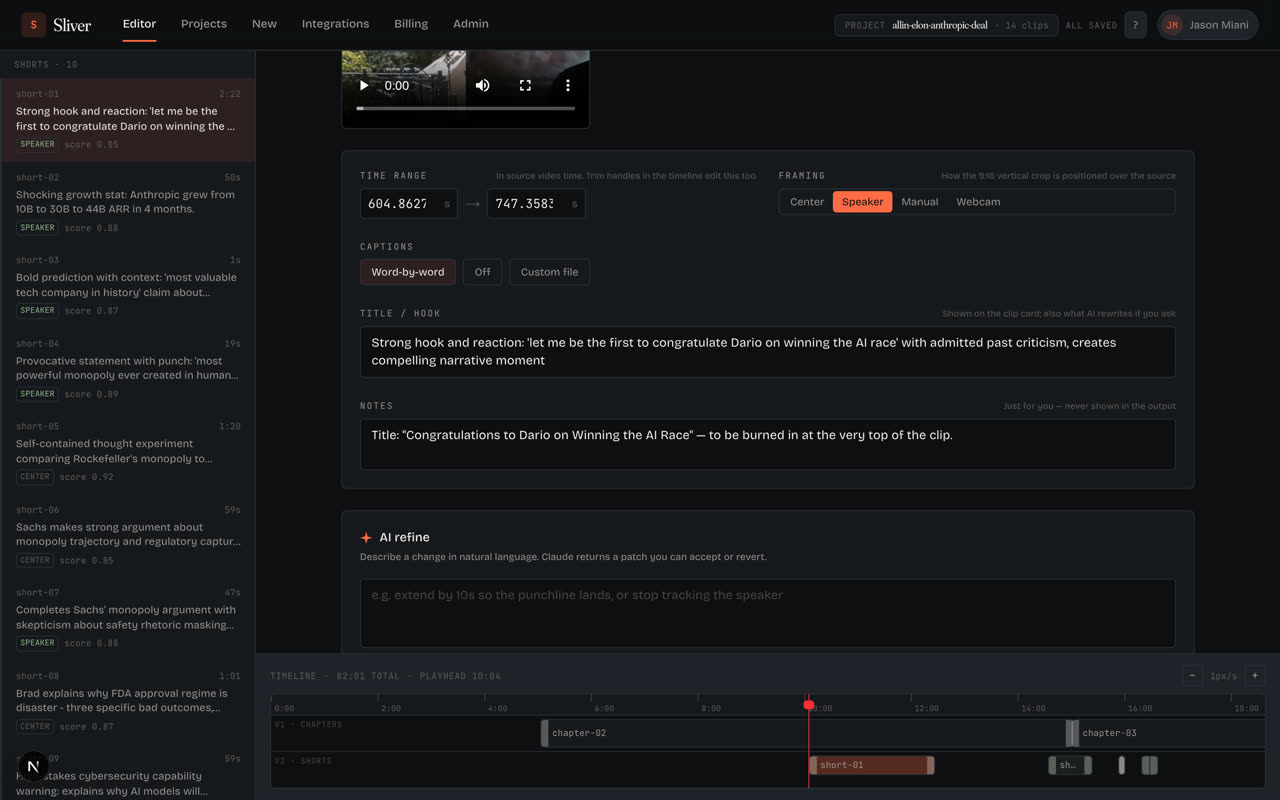
AI refine is best for direct editing instructions, not broad content strategy. - Step 02
Describe one change at a time
Short, concrete prompts work best: extend by 10 seconds so the punchline lands, stop tracking the speaker, use facecam layout, hide captions, add a top overlay that says NEW BUILD, or rewrite the title to be punchier.
- Step 03
Apply the change
Click Apply with AI or press Command+Enter / Ctrl+Enter. Sliver turns your request into an edit patch, saves it, and starts rendering the updated clip.
- Step 04
Read the edit log
The edit log shows your prompt, Sliver's reasoning, and the fields that changed. If a change is wrong, use Revert on that history entry.
- Step 05
Wait for the new preview
When the render starts, the preview shows the current render status. The previous playable version stays available while the new render is being created.
Good to know
What AI refine can change
AI refine can change timing, framing strategy, captions on or off, text overlays, title, hook/reason, and notes. Manual facecam box drawing still works best in the visual editor.
Keep prompts about video editing
Prompts should describe editing direction only. Avoid unrelated requests about code, databases, scraping, or account actions; those are rejected before they reach the editor.
Related
Was this article helpful?
If something here is wrong, out of date, or unclear, email support@sliver.video and we’ll fix it. Real humans read every message.